Generating Deployment Artifacts
A deployment artifact is an archive file that contains all the information required to deploy the application to runtime. It is the only artifact that is handed from the design phase to the runtime as it contains all the bundles and metadata that is required to deploy and run the application.
Applications are developed using the features available in TIBCO Business Studio™ for BusinessWorks™ and can range from simple to very complex. An application consists of an application module, which consists of one or more processes that define the business logic, and zero or more shared modules.
For more information, see "Application Modules" and "Shared Modules" in TIBCO Cloud™ Integration Concepts. Applications can also contain OSGi bundles that do not contain TIBCO Business Studio™ for BusinessWorks™ artifacts.
Applications are developed using the features available in TIBCO Business Studio™ for BusinessWorks™ and can range from simple to very complex.
An application archive contains one or more OSGi bundles, one each for all the modules referenced directly or indirectly by the application. It also contains application metadata which is used during deployment.
When creating an archive file for an application, the application packager also generates the processes in SVG format.
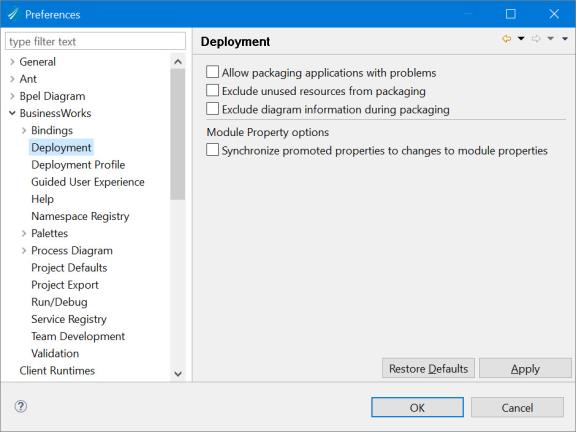
By default, the diagram information is present when exporting a process. To remove diagram information when exporting a process, navigate to the and select the Exclude diagram information during packaging check box.
There are multiple ways to create a deployment artifact:
- From the
Project Explorer view in
TIBCO Business Studio for BusinessWorks, open
and click
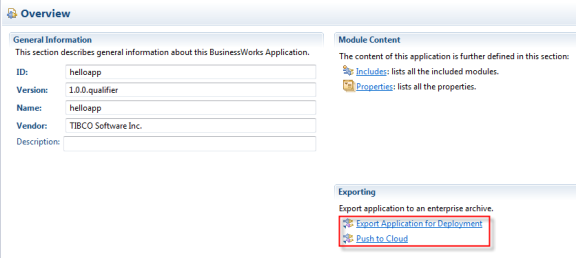
Export Application for Deployment link as shown below.
Note: When importing projects created in an older version of the software, if the application module or shared module version does not contain a .qualifier version, a design time validation error is thrown by default. Preference options can be set to ignore this validation error. Navigate to Window > Preferences > BusinessWorks >Validation >Missing .qualifier literal for module version. Preferences can be set to one of the following options:
- Error: The validation error is displayed in the Problems tab.
- Warning: A warning is displayed in the Problems tab.
- Ignore: The validation error is not displayed in the Problems tab.
In the EAR Export window, specify the location for the archive file and provide a custom name to the archive file, if needed, by clearing the Use Default EAR file name check box. Click Finish to create the deployment artifact (archive file).
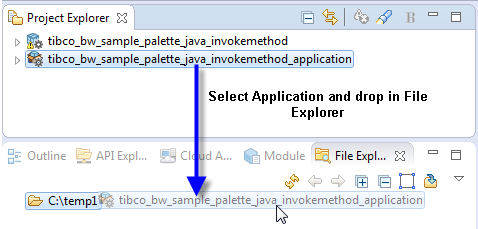
- By selecting the project application in the
Project Explorer and dropping it in the File Explorer an archive file for the application is created. If needed, change the default location in the File Explorer by using the
 Open Directory to Browse option in the File Explorer and select a custom folder. For example
c:/tmp.
Open Directory to Browse option in the File Explorer and select a custom folder. For example
c:/tmp.
Encryption settings are removed during packaging for security reasons and only the encrypted profiles are listed in the TIBCO.xml for admin's use.