Using AWS as a Configuration Management Service
You can use AWS Systems Manager Parameter store for configuration management services in TIBCO Business Studio for your BusinessWorks applications in TIBCO Cloud™ Integration by defining a token such as #/<APP_NAME>/<PROFILE_NAME>/<property name># in the application properties, where <property name> is the name of the configuration parameter.
For example, #/http.application/docker/testparam1#.
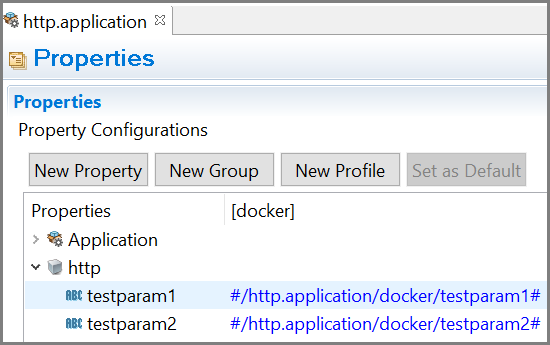
Follow these steps to use configurations from AWS Systems Manager Parameter store in TIBCO Business Studio for BusinessWorks™ applications in TIBCO Cloud Integration.
- Procedure
- Set the environment variables AWS_ACCESS_KEY, AWS_SECRET_KEY, AWS_REGION, AWS_PARAMETER_STORE, and APP_CONFIG_PROFILE.
- Select the desired profile as the default profile inside TIBCO Business Studio for BusinessWorks to fetch the values from AWS Server.
In your AWS parameter store, define the keys using the format /<APP_NAME>/<PROFILE NAME>/<KEY Name>.
For example, /http.application/docker/testparam1
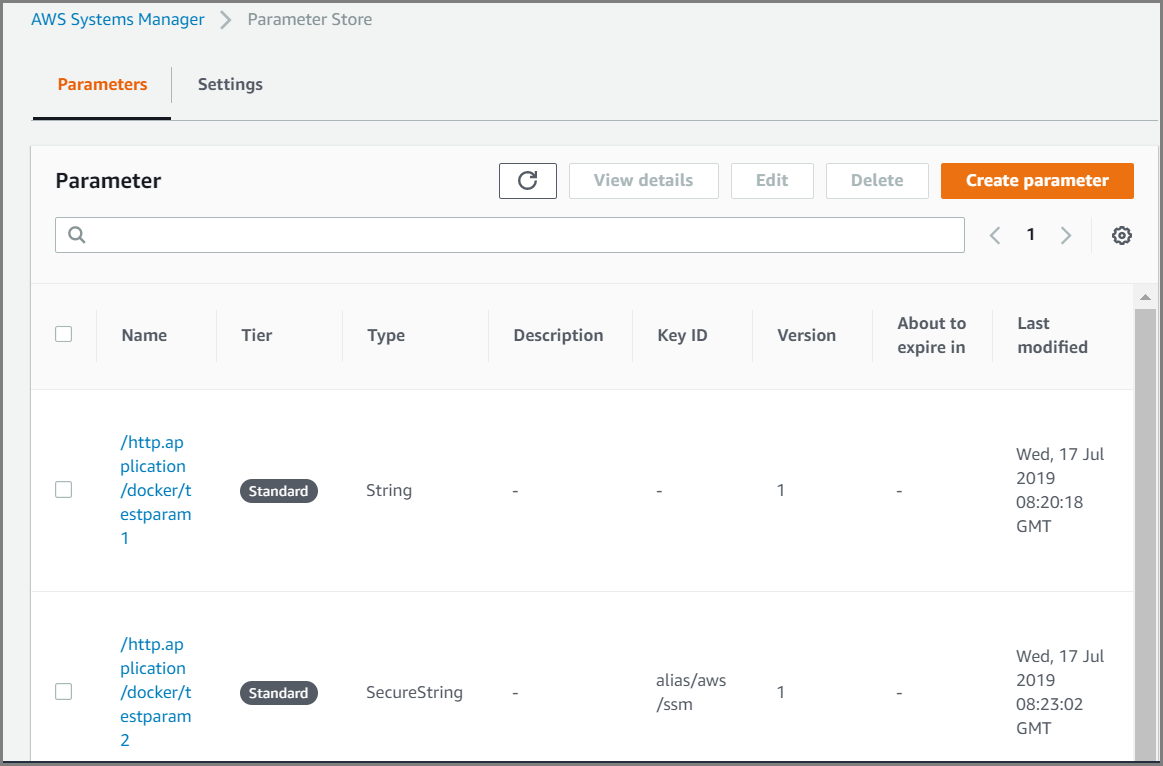
The AWS_ACCESS_KEY and AWS_SECRET_KEY environment variables are used as credentials for authentication. To enable assume role, the following additional environment variables should be passed, AWS_ROLE_ARN, AWS_ROLE_SESSION_NAME, AWS_EXTERNAL_ID (optional), and AWS_EXPIRATION_DURATION (optional).
To set the engine variables, refer Adding Custom Properties section in the Configuring App Properties topic.