Generating Concrete WSDL
You can create the concrete WSDL using Concrete WSDL Generation Wizard and using web browser.
Generate Concrete WSDL Using Wizard
To generate the WSDL:
- Procedure
- Click
Generate Concrete WSDL.
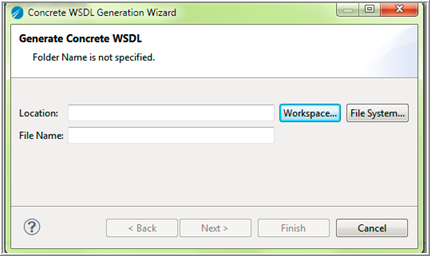
- Click the Workspace tab to create the WSDL in your workspace and specify a location where WSDL is to be created.
- To select a WSDL location:
- Click Workspace for a workspace location. Recommended: Select the Service Descriptor folder to contain all project-related workspace WSDLs.
- Click File System to save the concrete WSDL on a non-workspace disk location.
- Click Finish to generate a WSDL with default settings.
The File Name field shows the name of the WSDL, for example BooksService_gen.wsdl. Override it if necessary. - Click Next.
- Select the
Embed Abstract WSDL and
Embed Schema checkboxes.
By default the Embed Abstract WSDL and Embed Schema checkboxes are selected.
With Embed Abstract WSDL checkbox selected, the concrete WSDL generated has an abstract WSDL content in it.
The namespace of the concrete WSDL is the same as that of an abstract WSDL. If the checkbox is not selected, then the namespace of the concrete WSDL is different than that of the abstract WSDL.
When you select the Embed Schema checkbox, the concrete WSDL generated has the schema definition (mentioned in the abstract WSDL) in it. A schema without a target namespace is not supported.
Note: To avoid any namespace resolution error in the application module: If the concrete WSDL is placed in a workspace location (as mentioned in the earlier step), clear the Embed Abstract WSDL checkbox. - For advance configuration of the concrete WSDL such as Namespace URI, Service Name, Host, and Port (for SOAP over HTTP), click the Advance tab. Override them as per requirement.
- Click Finish.
Generate Concrete WSDL Using Browser
The following steps are applicable only for SOAP over HTTP service.
SOAP service must be running.
- Procedure
- Run lendpoints command on console to get the list of endpoint URLs.
- Copy the endpoint URL obtained in the browser. Append ?wsdl string and hit enter. This generates and downloads concrete WSDL on your local disk.