Map Exit Block
The Map Exit block causes the app to exit the current flow immediately and either continue to the next flow or exit the app with a fatal error. You can use the Map Exit block with an If/Else Block to trap an error condition in your data.
- The first batch of 200 records is updated in the target.
- The Update block begins caching records for the second batch.
- The flow reaches 275 records.
- The Map Exit block exits the flow.
- The 75 records cached by the Update block are not sent to the target because the Map Exit block has exited the flow and stopped processing before the batch was complete.
Map Exit Example
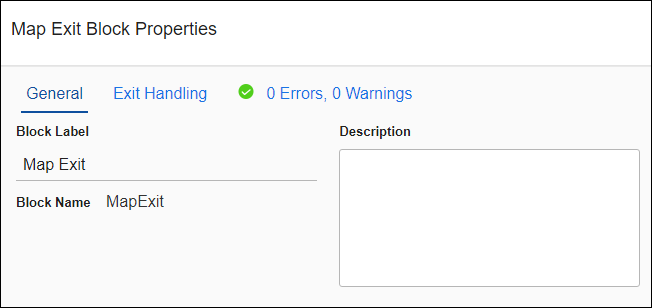
The Map Exit block is useful for testing a flow by stopping the flow after a specified number of records. This can be faster than using the Debug option and helps you run through a subset of records to find subtle data or logic errors. This method is helpful for getting performance metrics. The following example exits the flow after a specified number of records have been processed by using the RECNUM() function, an If/Else block, and a Map Exit block.
Create a flow with a Query block and a For Each Result block and then add the following:
- Add a Group Comment block and label it Stop after # records.
- Add an If/Else block inside the Group block with a condition on the If.
- Left Value: RECNUM()
- Operand: is greater than
- Right Value: [numeric value]
- Add a Map Exit block inside the If section of the If/Else block. If the Condition is met, the Map Exit block exits the flow.Note: Placing the If/Else and Map Exit blocks at the beginning of the flow ensures that the If/Else is always executed. If the If/Else block is at the end of the flow, it does not take into account failed records and may process more records than you intended.
- Make sure Batch Processing is disabled on any blocks where Batch Processing is an option. Incomplete batches are flushed if the Map Exit block runs.
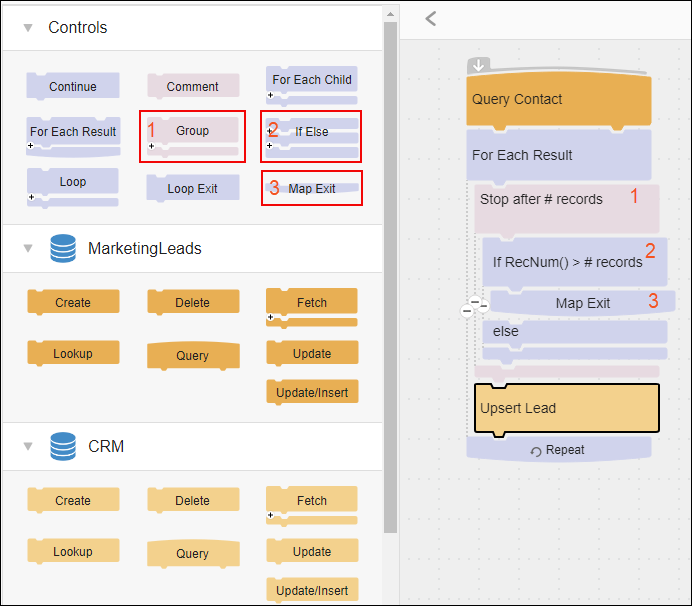
Block Properties - General Tab
From the General tab, you can change the Block Label and add a description.
Block Properties - Exit Handling Tab
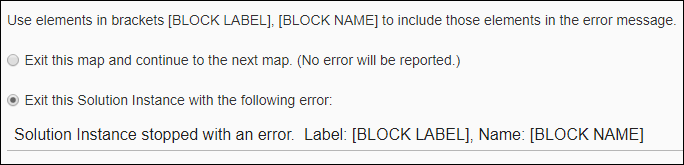
Use the Exit Handling tab to determine app behavior after exiting the flow.
- Exit the current flow and continue to the next flow without an error.
- Stop the app and write an error to the Execution History Log. See Viewing Execution History.
If you choose to write the error to the History Log, either:
- Use the suggested message wording supplied by TIBCO.
- Change the error message for this error. You can use any text as well as [BLOCK LABEL] and [BLOCK NAME] to include the Block Label or Block Name from which this error originated. These options can help you determine the operation or block that caused this error to occur.
Block Properties - Errors and Warnings Tab
If there are any errors or warnings for this block, the Errors and Warnings tab displays the number of errors or warnings in the tab name. See Block And Flow Errors And Warnings.
Once you have corrected the errors, select the Validate button to update the Errors and Warnings tab.